Every cue lands on the frame.
Right in front of the actor.
Panda Streamer is BAM Studios' visual cueing system for ADR. Streamers, the 3·2·1 beeps, the line and the take number appear on the booth monitor over the picture, driven by Pro Tools, so the actor sees and hears exactly when to come in.
Designed and built in-house at BAM Studios, Chicago.
On the ADR stage at BAM for
- Chicago Fire
- Chicago P.D.
- Chicago Med
On the frame, every time
Timing runs from the clock, not the screen's refresh. The punch lands on the frame nearest the cue's In, and a busy computer never stretches a streamer.
Follows Pro Tools
It chases Pro Tools' timecode. Play the session and each cue fires by itself at the right moment, pass after pass, with no one pressing a key.
Clean picture in between
Nothing is drawn over the picture unless a cue is running or you switch something on. Between takes the actor sees the scene and nothing else.
Designed by people who've worked in audio post since 1987, for engineers, supervisors and the actors in the booth.
In the booth
What the actor sees
Everything sits on top of the Pro Tools picture on the booth monitor. Each element can be switched on or off, sized and placed to suit the actor and the room. The finished picture goes out through any Blackmagic Design video card or converter, over SDI or HDMI, to whatever monitor or display the booth has.
Streamers
A line wipes across the picture and punches on the In. Choose the length (one to five seconds), direction, colour and width, with an optional flash on the punch.
Flutters
Short flashes leading into the punch, for actors who like a rhythm to come in on.
3 · 2 · 1 counter
A large countdown that lands on each beep, not on each second, so the numbers and the sound always agree.
The line on screen
The character and the line in a band over the picture, from the start of the streamer or only at the punch, held through the cue with a progress bar, or the next line shown ahead.
Recording and Playing lights
A red Recording light while Pro Tools records and a green Playing light on playback, so the actor always knows whether it counts.
Cue and take badge
CUE 103 · TAKE 2 in a corner or in the band, sized as a share of the picture so it reads on any monitor.
Timecode window and masks
A burned-in timecode window when the actor or director wants one, and masks to cover a client's burn-ins or letterbox bars. The masks are saved with each show's job, so the burn-in is covered the moment the job opens.
Alt reads and combined cues
Alternate lines get their own rows and passes, and short cues can be combined into one pass with one streamer.
Sound
What the actor hears
The beeps come from the same system as the picture, so they always land with the streamer.
BAM's reference beep
The same three beeps BAM has always cued with, leading the actor into the line.
Beeps to suit the actor
The beeps can be changed to suit the actor or the production, and the 3·2·1 on screen always follows them.
Slate your way
Most sessions are slated by the engineer, as always. If you prefer, Panda Streamer can speak the slate for you, "Margo, cue 103, take 2", before the beeps. It's an option, off unless you want it.
Pro Tools
Run the session from the cue list
Pro Tools stays in charge of the picture and the recording. Panda Streamer follows it, and can drive it from the cue list.
Timecode or MIDI notes
Panda Streamer chases Pro Tools' timecode, so every cue fires on its own. It can also fire from notes on a MIDI track, for sessions set up that way.
Play, record and stop per cue
Each row has its own transport. ● moves Pro Tools to the cue, rolls and records; ■ stops it.
Takes counted for you
A take is counted when Pro Tools actually records, whether it started from the cue list or from the console, and the next take number is ready on screen.
Stopped early, nothing wasted
Stop a take during the pre-roll or the 3·2·1 and it doesn't count: the take number goes back and the recording is undone in Pro Tools, so the take list stays clean.
Grab timecode from Pro Tools
Stop Pro Tools where the line starts or ends and grab it as the cue's In or Out, then nudge a frame either way.
Memory Locations for every cue
One click in Panda Streamer: every cue, for every character, becomes a Memory Location in the open session, named like MARGO 103 and spanning the cue's In to Out.
Record tracks named per cue
Each character gets a record track, renamed for the cue and record-armed, so takes come out named MARGO 103_01, MARGO 103_02.
Guide track prep
One click moves each cue's original line to a second dialogue track, muted while recording and heard on playback as the actor's reference.
Matches the session
Reads the session's timecode rate and start from Pro Tools, so the cue list and the session always agree.
Control
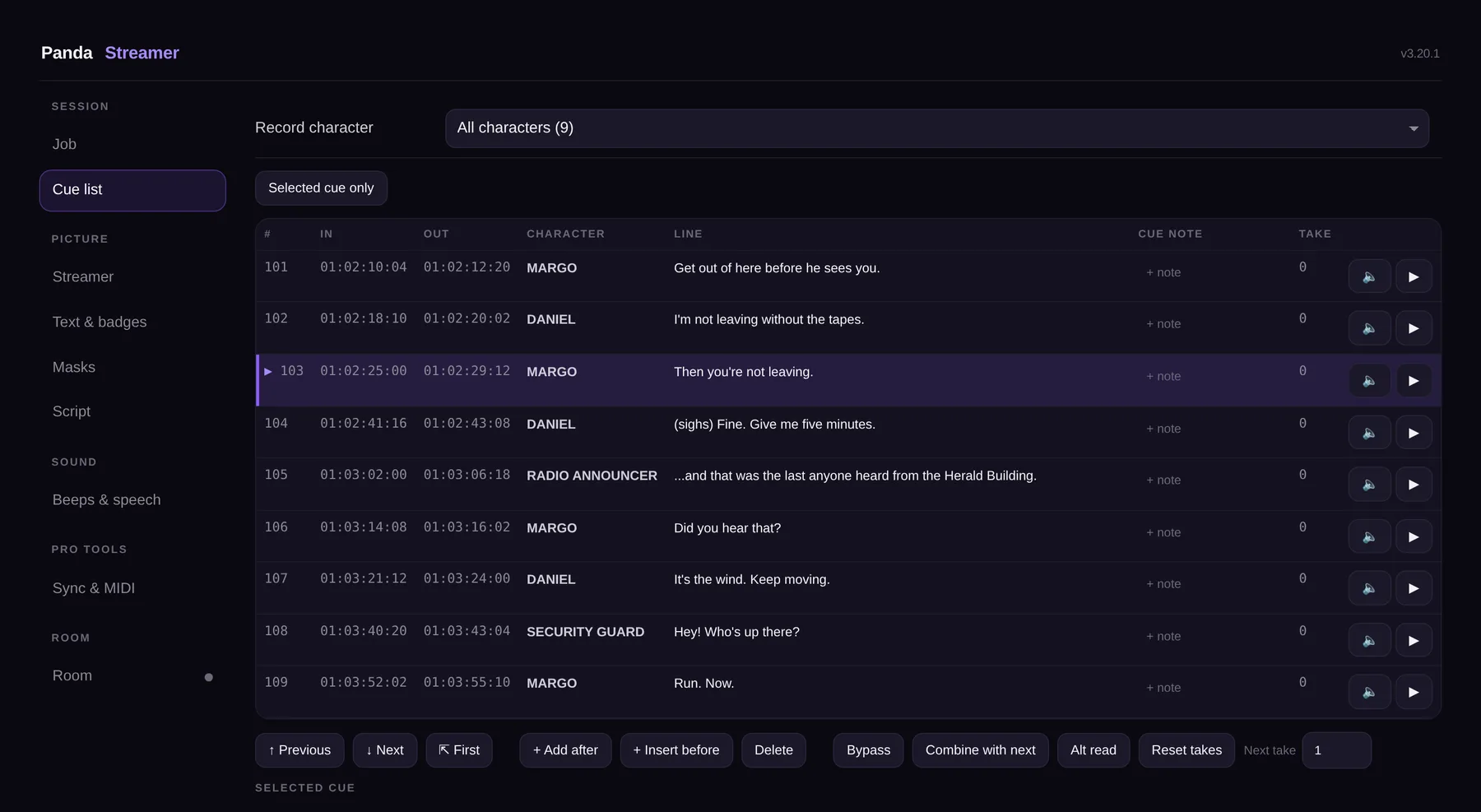
One page runs the session
The control page is off-air. The engineer works from it on the Pro Tools Mac, and the supervisor can follow and edit from a laptop in the room.
✅ Take grid
Mark each take good, maybe, no, keeper or alt, with a note, from the keyboard or with a tap.
🗂️ Jobs on the server
Every job is saved to BAM's server and opens in any room. Room calibration stays with the room.
🖨️ Print-ready sheets
Mixer, actor and full cue sheets, with the takes marked, straight from the job.
💻 Supervisor's laptop
Open the room's control page on the studio network with the room's access code. Both people edit the same list.
🩺 Room health
One page shows what is working and what is not, with one-click fixes, before the actor arrives.
🎛️ An actor's look, on any stage
Save the streamer an actor likes under their name and call it up in any of our rooms, months later. A whole stage's setup can be saved and shared the same way.
From sheet to take
From the client's cue sheet to the first take in three steps
Cue sheets and jobs, handled so the session starts on time.
Bring in the sheet
Import the client's PDF cue sheets, several at once, or a text or subtitle file. Nothing changes until you have checked what is new, what has changed and what you already have.
Select the cue and press ●
Pro Tools locates and rolls, the beeps play, the streamer punches on the In and the take records.
Mark the take
Mark it in the take grid and go again, or move on. The job saves itself to the server as you work.
Reads client cue sheets
The PDF cue sheets studios and networks send, in the common layouts: traditional ADR sheets and actor's and engineer's lists. Several PDFs at once become one list in timecode order.
Check before you import
See what's new, what changed and what you already have before anything changes. Revised sheets keep your takes and notes, and duplicate cues are found and removed in one click.
Subtitles, text, spreadsheets and MIDI
When there's no PDF, a subtitle file, a text or spreadsheet export or a MIDI file works too.
Job details filled in
Project, episode, version and date are read from the sheet, ready for the job title and the printed sheets.
Build a cue list by hand
Start a new job and add cues yourself, with quick timecode typing, when there's no sheet at all.
Notes on every cue
A short room note per cue, like "wears mask", that never appears on the booth picture.
Engineer and supervisor per character
Kept with the job and printed on the sheets.
Export
The cue list goes out as a MIDI file or a spreadsheet for editorial and the client.
📖 Narration mode
The manuscript on screen with punch-in and a take log, for audiobooks and narration. Word and PDF manuscripts are split into sentences or paragraphs under their chapter headings.
📜 Teleprompter mode
A scrolling script from the same cue list, for voice-over to picture.
ADR from anywhere
Panda Streamer and Panda Patch: the stage goes to the actor
Your actor is on a cruise ship heading to San Juan, and the line has to be fixed this week. BAM's two in-house apps work together so the session still happens, with picture, streamers and a clean recording.
Panda Streamer builds the cue
On our stage, Pro Tools plays the scene and Panda Streamer adds the streamer, the 3·2·1, the line and the take number, exactly as it would for an actor in our booth.
Panda Patch sends it to the actor
The actor opens a link in Chrome or Edge on a laptop. Nothing to install, no account. The picture with its streamers and the cue mix with its beeps arrive on their screen and in their headphones.
We record, here
Whatever mic they have, a USB mic, a headset or the laptop's own, comes back to our Pro Tools as a 48 kHz recording. A backup copy is captured on the actor's end and sent afterwards, in case the ship's connection drops.
- Built for weak connections. Panda Patch measures each guest's connection and picks a stable rate, protects against dropouts and reconnects by itself.
- Directors and clients on the line. Up to four guests in one session, so the director and the producer can listen and give notes from wherever they are.
- Or send the kit. When a proper setup is possible, BAM's mobile ADR kit is available on request.
What's next
ADR cues from Pro Tools' speech-to-text
Highlight the words. Get the cue.
Pro Tools can already transcribe dialogue. Next, Panda Streamer will turn a highlighted passage into a finished ADR cue, with the text and the In and Out timecode filled in.
- Pro Tools transcribes the production dialogue.
- You highlight the words you want, in Pro Tools or in Panda Streamer.
- Create ADR cue fills in the text, In and Out.
- You pick the character, and the cue is ready to record.
Also coming: a small live view of the booth picture on the control page, so the engineer and the supervisor see exactly what the actor sees.
Planned: NDI output. The finished booth picture, streamers and all, sent as NDI across the facility network, alongside the SDI and HDMI outputs available today.
The aim isn't to take over the assistants' prep work. It's to remove the repetitive steps, so sessions are ready with less stress and we get to recording with the actors sooner.
ADR at BAM
Serious ADR in Chicago since 1999
Panda Streamer is part of how BAM runs ADR: for feature films, TV and streaming series, commercials, trailers and promos, documentaries, animation and games.
- 4
- Dedicated ADR stages
- 2
- Chicago locations
- 39
- Years of audio post
Studio Z · CineBAM
Chicago's largest dedicated ADR stage, on the Cinespace Film Studios lot, so productions shooting there go from set to ADR without leaving campus.
Studio A · BAM HQ
The flagship stage in River North: a spacious booth, client lounge and a control room built for feature and episodic ADR.
Studio B · BAM HQ
Purpose-built for dialogue and exceptionally quiet, for pickups, television sessions and fast turnarounds.
Studio C · BAM HQ
Highly isolated, with floated floors and a large-format picture display, so talent works from the same picture as the control room.
Content and security approved by Disney (including Pixar, Marvel and Lucasfilm), Amazon Studios, NBCUniversal, Apple TV+, MGM, Paramount, Starz, Lionsgate and others. ADR supervision, loop group and walla, all under one roof.
Built at BAM
Made in-house by the people who run the sessions
BAM has worked in audio post since 1987. We build our own tools when the ones on the market don't fit how we work, and we test them in our rooms before a client ever sees them.
Questions
Frequently asked
Who built Panda Streamer?
BAM Studios' own team, in-house in Chicago. Every feature was designed with the engineers and supervisors who use it and tested in a working ADR room, on real sessions.
Does the actor need to do anything differently?
No. The actor watches the booth monitor as usual. Streamers, beeps and the line can be turned up, down or off to suit how they like to work.
How accurate is the timing?
The punch lands on the frame nearest the cue's In. Timing comes from the clock rather than the screen's refresh, so a slow frame never delays or stretches a streamer. We test it to within a single frame.
Which cue sheets can it read?
The PDF cue sheets studios and networks send, in the common layouts: traditional ADR sheets with start and stop times, and actor's and engineer's lists with take grids. Subtitle files and text or spreadsheet exports work too. When a revised sheet arrives, only the new and changed cues are added, and takes already recorded are kept.
Can the supervisor and director follow along?
Yes. The supervisor can open the room's control page on a laptop on the studio network, with the room's access code, and edit the cue list and take notes alongside the engineer.
Can we do ADR with an actor who isn't in Chicago?
Yes. With Panda Patch, the actor joins from a link on a laptop and sees the same picture, streamers and beeps as our booth, while we record them here. Directors and producers can join the same session. BAM also supports Zoom, Source-Connect, SessionLinkPRO, Audiomovers and Cleanfeed, and has a mobile ADR kit.
Does it change our Pro Tools session?
Only when you ask it to: adding Memory Locations, naming record tracks or preparing the guide track. Each of those is a button you press, and the session is saved first where it moves audio.
What does it run on?
The Pro Tools Mac and the booth monitor you already have. The picture goes out through any Blackmagic Design video card or converter, over SDI or HDMI. Nothing is added to Pro Tools itself, and the cueing works without an internet connection.
Work with us
Book your ADR at BAM Studios
Feature film, TV series, commercial, trailer, documentary, animation or game: tell us about the project and the dates. We'll set up the session around your cue sheets and your actors, in Chicago or wherever they are.
Book a sessioninfo@bamstudios.com312-255-88621 East Erie Street, Chicago